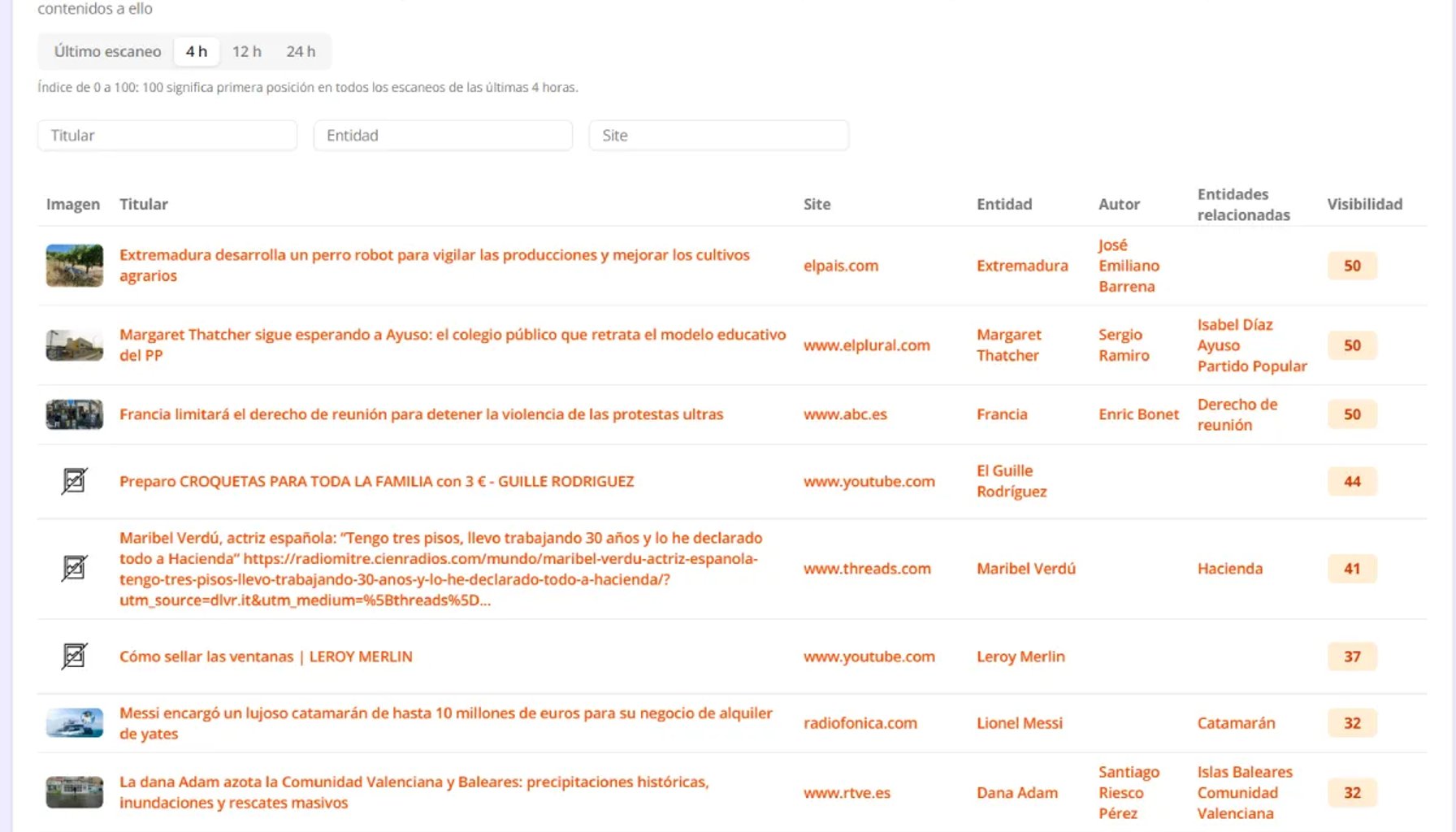
At Discover Monitor we listen to our clients, and there were two requests we kept hearing over and over: "I want to see what has happened in Discover over the last few hours, not just the last hour or one specific hour" and "knowing how many times a story appears isn't enough, I need to know how much visibility it really has". Today we're happy to announce that both features are now available on the platform.
New time filter: last 4, 12 and 24 hours
Google Discover moves very fast. A story can enter the feed, reach the top and disappear within a few hours. That's why we've added a filter that lets you choose the time period you want to analyze:
- Latest scan: the usual view, the latest hour with an exact snapshot of the feed at that moment.
- Last 4 hours: to spot which topics are taking off and react before your competitors.
- Last 12 hours: to understand how the day is going and which content has performed best in the feed.
- Last 24 hours: to get the full picture of the day and see which stories have dominated Discover.
The filter is available in the "Most viewed in Discover" block on the main dashboard page and on the "TopNews Discover" page. As always, each country has its own independent analysis.
New news visibility index
Appearing in the first position of the feed is not the same as appearing far down, since the traffic Google Discover sends to your site varies greatly depending on the position in the feed. That's why, when you choose a 4, 12 or 24-hour period, each story shows a visibility index from 0 to 100, which sums up its real presence in Google Discover in a single number.
How is it calculated? In each scan we take the positions of every appearance of a story in the feed and give it a weight based on how high up it is. The first position is worth the maximum, and the value of the following positions decreases progressively on a logarithmic scale (the second position is worth about 63%, the third 50% and the tenth less than 30%). So the CTR by position in Google Discover looks like this:
We calculate it across all the scans in the time period you have selected. This way:
- 100 means the story has been in first position in every scan of the period.
- A story that appears in more scans and in
gets a higher index. - When you hover over the index you'll see how many scans the story was seen in and its best position.
Stories are sorted by this index, so at a glance you know which ones have had the most real impact. You can compare yourself with your competitors using an objective criterion, and you can discover which topics and headlines manage to reach the top of the feed and stay there the longest.